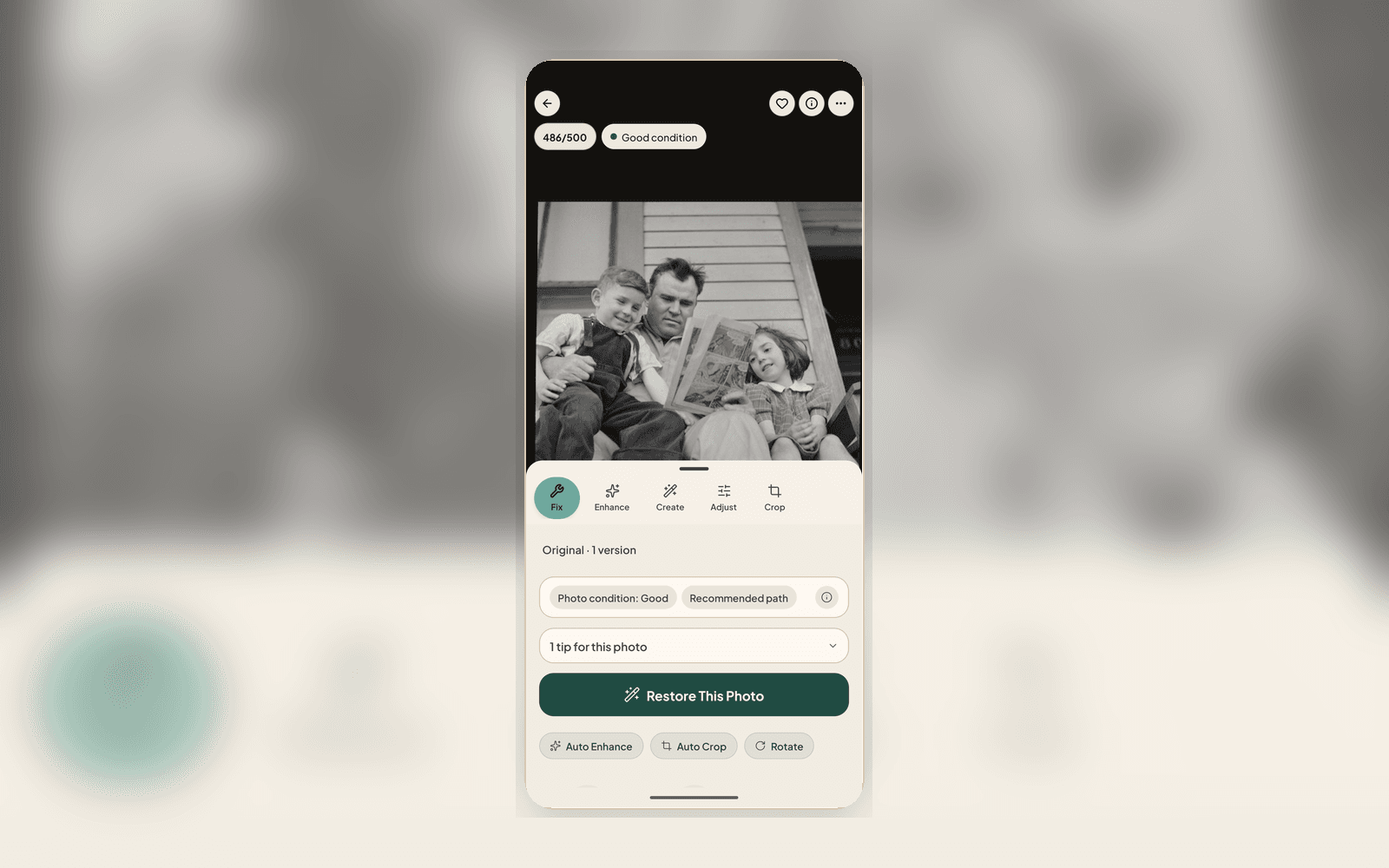
What is new
Nostalgia 2.1.13 focuses on the path from phone scan to finished family archive. The update makes it faster to review a new capture, clearer to choose the next repair step, and easier to finish results without losing the Source.
iPhone is available on the App Store today. Android remains invite-based while broader Google Play availability rolls out, and the web app continues to be the fastest place to start restoring immediately.
Local-first scan and edit
The mobile flow now gets you to a usable photo sooner. Single-photo scans and imports can open into review and editing before every background save or sync step is complete.
Crop, rotate, adjust, filters, and preview work stay available locally, while restore, captions, stories, dates, share links, and continue-on-web actions keep syncing in the background.
One photo check next action
The photo check now focuses the decision. Instead of presenting multiple recipe tiers, it chooses one next best action for the selected photo and explains the condition, expected result, and optional follow-up steps.
That action may be a manual crop or adjustment, a safer repair, denoise, deblur, enhance, color, or a rescan prompt when the capture itself is the limiting factor.
Progress & Review is the work queue
Restore follow-through now lands in Progress & Review. That is where you compare a Source and result, retry a failed or weak result, choose the restoration, and continue into your Archive or private sharing.
Your Archive stays focused on browsing photos, albums, timeline, people context, captions, dates, tags, favorites, and Versions. Accepted Sources are preserved alongside prepared scans and restoration results.
What to check after updating
Open Restore, choose a photo, review the photo check recommendation, and run the suggested next action only if it matches the photo. If the app asks for AI Processing consent, Not now keeps you on local editing tools; Allow & continue starts the cloud repair.
When the result returns, compare before saving. The point of this release is not one-tap magic; it is a clearer path from capture to review to a durable family archive.
Related posts
NewsWhat's New in the Nostalgia Editor (April 2026)
A quick tour of the refreshed Nostalgia editor: one unified screen for viewing and editing, a Photo Health banner, five tool tabs (Fix, Enhance, Create, Adjust, Crop), and background processing that doesn't block you.
GuideWhat Is the photo check? The AI Report That Checks Your Photo Before You Restore
Every upload gets a photo check report covering damage labels, era estimate, next best actions, and conservation guidance, all before you use a single restore.
 Guide
GuideThe Family Historian's Guide to AI Photo Restoration
If you're building a family archive alongside your tree on Ancestry or MyHeritage, here's how to use AI photo restoration without compromising archival integrity.