Why we ran this test
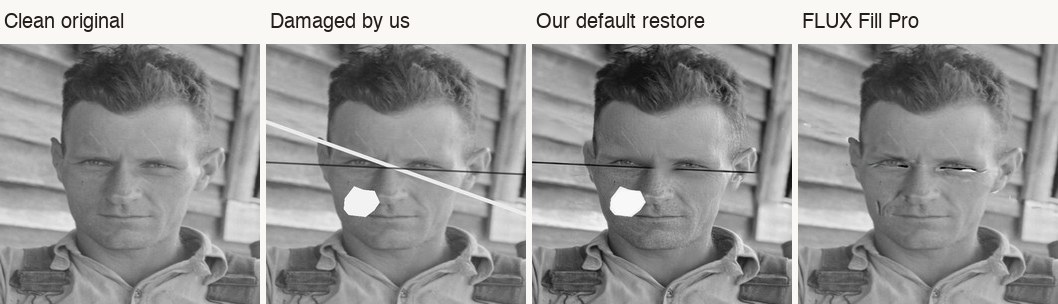
When a family photo is scratched across someone's face, the repair that matters is the one that keeps the person. We tested four ways of repairing damaged faces, including our own one-tap restore, and measured how much damage each removed and how much each changed the face.
Our own default restore did not pass. This is what we measured, what we changed because of it, and what it means if you are restoring a family photo yourself.
What we did
- We took eight portraits from the Farm Security Administration collection at the Library of Congress, made in 1936 and 1937 and in the public domain, including Dorothea Lange's "Migrant Mother".
- We resized each to a typical phone upload, 1,600 pixels on the long edge, and added the same damage to every face: a bright scratch through the eyes, a crease, and on alternate photos a missing patch on the cheek.
- Because we damaged clean originals, we know what each face should look like. Against the clean original we measured the damage left inside the face, how similar the face still looks (a face-recognition similarity score, where 1.0 means identical), and fine structure (SSIM).
- We compared four approaches: our default one-tap restore; our "mark the damage" repair as it shipped, which leaves faces alone; a local fill that borrows from nearby pixels; and FLUX Fill Pro, a generative fill model from Black Forest Labs.
- The whole test cost about $1.91.
What we measured
For each approach: the share of the damage left inside the face (averaged over the eight photos), the face similarity on the worst photo, and fine structure compared with the damaged photo.
- Damaged photo, untouched: 100% of the damage left, worst similarity 0.77.
- Our default restore: 74% left, worst similarity 0.69, fine structure worse than the damaged photo.
- Mark the damage, faces left alone: 100% left, worst similarity 0.77, fine structure unchanged.
- Local fill on faces: 18% left, worst similarity 0.55, fine structure better.
- FLUX Fill Pro on faces: 27% left, worst similarity 0.53, fine structure better.
What we saw
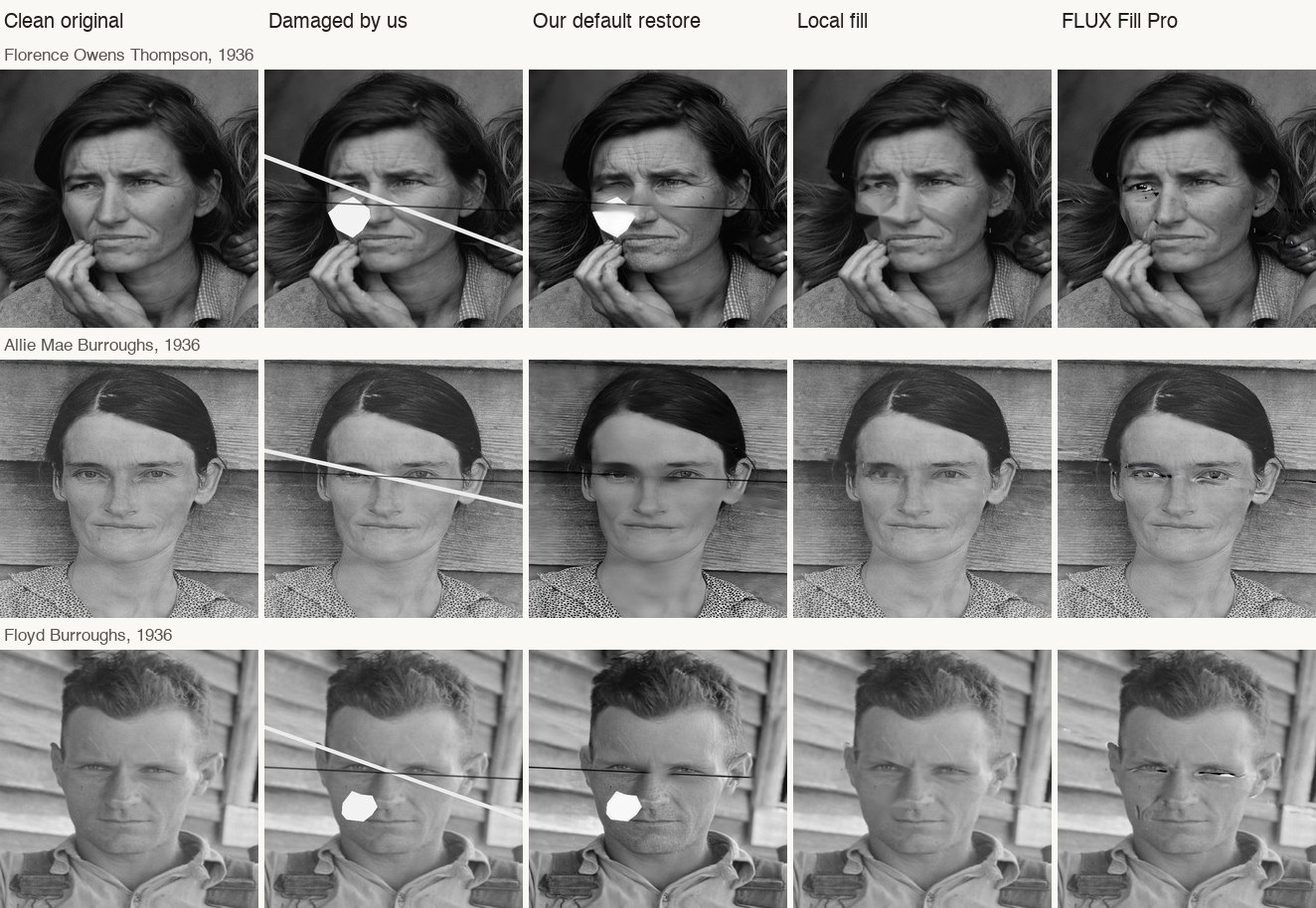
Our default restore did not repair damage across faces. On 4 of the 8 photos it removed none of the damage inside the face, and it lowered face similarity on every photo. It also smoothed skin: Allie Mae Burroughs looks waxier after it.
FLUX Fill Pro removed most of the damage by inventing what was underneath. It drew dark streaks across the eyes on 3 of the 4 large faces, and on one small face it replaced an eye.
Face size decides whether a careful fill is safe. On faces at least 338 pixels wide, the local fill removed most scratches and kept the person (similarity 0.92 to 0.96). On faces under 120 pixels it smeared the features, and the face looked less like itself than the damaged photo did.
What we changed
- The generative fill stays off faces.
- When you mark damage to repair, fixing scratches on a face is now a choice you opt into. It is offered only on faces at least 300 pixels wide, and only for thin scratches and creases. Missing patches are left as they are, and the original stays in Versions.
- On the four large faces, that choice raised similarity on three (Floyd Burroughs went from 0.86 to 0.92) and lowered it slightly on one (Allie Mae Burroughs, 0.965 to 0.950). That dip is why it is a choice, not the default.
- When we leave damage on a face, the result says so instead of calling the photo restored.
- We stopped claiming that our one-tap restore repairs damage without changing the person, because on damaged faces it does not yet. Every restore is still checked against the faces in the original, and when a face changes too much we say so or keep the original.
If you are restoring a family photo
- Keep the original, and compare the faces side by side at full size before you share a result.
- Be wary of any tool that makes a badly damaged face look perfect. When damage covers an eye, something had to be invented.
- Small faces in group photos are the hardest. A faithful repair may have to leave some damage.
Limits
Synthetic damage is cleaner than real damage, eight photos is a small set, and face-similarity scores are noisy on faces under about 120 pixels. Next we are testing real damaged prints. We kept the method, the data and every output, and we will share them on request.
Related posts
 Guide
GuideHow to restore a scratched or faded family photograph without changing who they are
A practical guide for family historians on repairing scratched, faded, or damaged family photos while keeping likeness intact, Source preserved, and privacy first.
 Tips
TipsWhat AI Photo Restoration Can (and Cannot) Do in 2026
An honest look at what AI restoration is great at, where it struggles, and how to get the best results from your old photos.